Infographics Guideline

Presenter standing beside a large screen showing a revenue growth chart with projected increases over time during a corporate presentation.

Infographic style

The infographic style is simple and two-dimensional. Content is reduced to the essentials, with only necessary information included. Excessive detail is avoided to ensure clarity and easy comprehension. The main characteristics of the infographic style consist of: straight lines, sharp edges and color shades

Straight lines


Straight line chart with multiple intersecting lines showing fluctuating data points over time

Sharp edges


Vertical bar chart with sharp-edged columns in red, gray, and black representing category comparisons

Division lines


Layered area chart with division lines separating red and gray data segments

Visualization

Different types of infographics are individually defined. The key to data visualization is to make complex content accessible and visually supportive. Always choose the form that presents information in the clearest way.

Column chart


Column chart displaying yearly values with red and gray columns for comparison

Bar chart


Horizontal bar chart comparing multiple categories with labeled numeric values

Area chart


Area chart showing rising and falling trends with stacked red and gray sections

Line chart


Line chart with marked data points and percentage labels indicating growth over time

Pie chart


Circular pie chart with segmented ring and central numeric value indicator

Colors

A defined color system creates visual hierarchy, strengthens orientation, and reinforces brand identity. Applying the priority colors in the specified order ensures consistency and a clear, recognizable appearance across all infographic applications.

Primary Colors

Red


Red Primary

Loader White


Loader White Primary

Limestone


Limestone Primary

Yellow (Logo)


Yellow(logo) Primary

Secondary Color

Bright Limestone


Bright Limestone Secondary

Infographic colors

To ensure strong brand recognition, the priority colors must always be applied in the defined order. The sequence depends on the size of the graphic areas: the largest area uses the first color, the second-largest uses the second, and so on.


For further differentiation, additional color shades may be used after the three priority colors, while ensuring sufficient contrast.

PRIORITY USE

RGB: 156 | 152 | 144
HEX: 9C9890
CMYK: 41 | 35 | 41 | 2

Infographic Colors asset 1

SHADE COLOR

RGB: 92 | 89 | 83

HEX: 5C5953

CMYK: 60 | 54 | 59 | 30

Infographic Colors asset 2

SHADE COLOR

RGB: 119 | 114 | 106

HEX: 77726A

CMYK: 53 | 47 | 53 | 15

Infographic Colors asset 3


PRIORITY USE

RGB: 218 | 0 | 4

HEX: DA0004

CMYK: 0 | 100 | 95 | 10

Infographic Colors asset 4

SHADE COLOR

RGB: 154 | 3 | 4

HEX: 9A0304

CMYK: 24 | 100 | 100 | 24

Infographic Colors asset 5

SHADE COLOR

RGB: 182 | 5 | 7

HEX: B60507

CMYK: 19 | 100 | 100 | 12

Infographic Colors asset 6

SHADE COLOR

RGB: 239 | 105 | 107

HEX: EF696B

CMYK: 0 | 73 | 50 | 0

Infographic Colors asset 7

PRIORITY USE

60% Black

RGB: 102 | 102 | 102

HEX: 666666

CMYK: 0 | 0 | 0 | 80

Infographic Colors asset 8

SHADE COLOR

80% Black

RGB: 51 | 51 | 51

HEX: 333333

CMYK: 0 | 0 | 0 | 80

Infographic Colors asset 9

SHADE COLOR

70% Black

RGB: 77 | 77 | 77

HEX: 4D4D4D

CMYK: 0 | 0 | 0 | 70

Infographic Colors asset 10

Colors application order

Depending on the number and size of graphic elements within an infographic, colors must be applied in a defined order.

Priority Colors (strict order)

There are three main colors that always have priority use. They must be applied in the following order based on area size.

1. #9C9B90:
Always used for the largest area.

2. PALFINGER Red: Always used for the second-largest area.

3. 60% Black: Always used for the third-largest area.

Three circular donut charts showing numeric value 1.256 with priority color usage, demonstrating light gray as the largest area, red as the second largest area, and dark gray as the third largest area

Color shades for differentiations 


Once the three priority colors are used, additional shades can be applied more freely. They serve for differentiation in diagrams or complex graphics.

Ensure that similar shades are not placed directly next to each other to keep contrasts clear and differences visible.

Single donut chart showing numeric value 1.256 with multiple red, gray, and dark gray color shades used to demonstrate differentiation in complex graphics

Background colors

Infographics can only be placed 
on two background colors: 
White and Limestone

Area chart comparing values across three points, using layered gray and red color areas to illustrate trends and differences over time

World map

Within maps the following colors can be used to highlight and display content:

Countries highlighted

  • Red
  • #EF696B

Countries not selected

  • Bright Limestone

Info box

  • Limestone with 65% opacity
World map highlighting PALFINGER’s global presence, with regions in red and limestone tones, labeled headquarters and regional offices across NAM, LATAM, EMEA, and APAC, and explanatory color legend above the map

Tables

Tables have a clear and reduced style. The following aspects are important for a consistent appearance:


Font: In tables PALFINGER Text Regular and Bold are used.

Lines for separation: Tables use only horizontal lines to divide sections. Three different line weights are used to represent hierarchies.

Highlight color: To highlight a column or row Limestone is used.

Background: Tables can be placed on White and Bright Limestone.

DIN A4 format

Table style and specifications
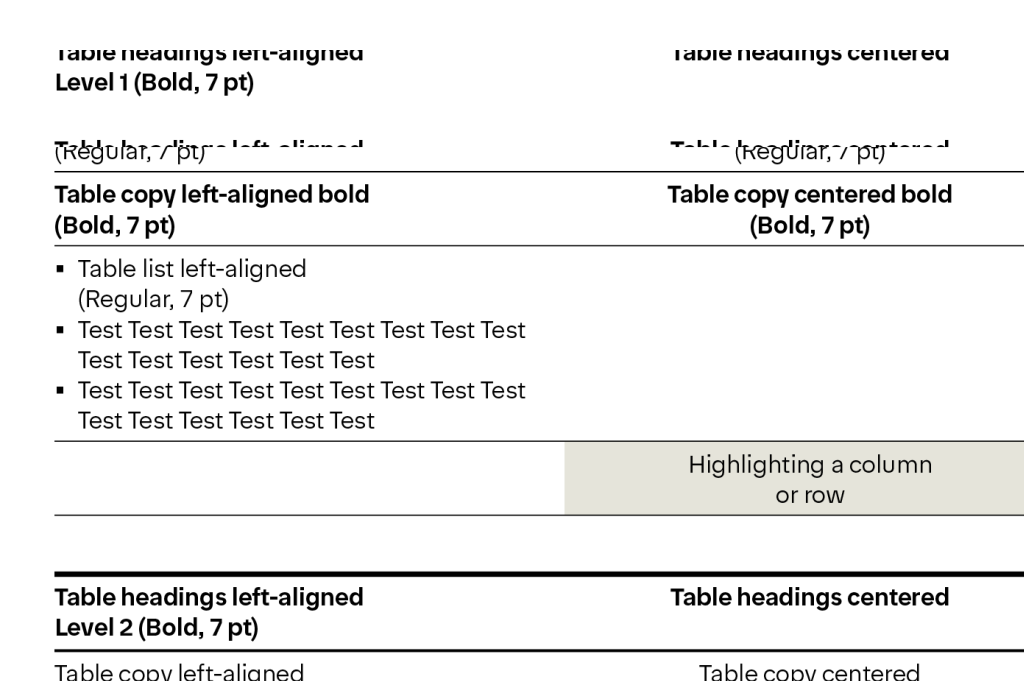
Table layout example with left-aligned and centered headings, bold hierarchy levels, and highlighted rows, demonstrating table style specifications for print use.

Table style

on a White background (left) and

on Bright Limestone background (right)

Comparison of table styles on white and bright limestone backgrounds, showing consistent headings, row dividers, and highlighted totals.

Signal colors

Signal Green, Signal Yellow, and Signal Red are strictly reserved for signaling purposes and may never be used in infographics.

Signal Green

RGB: 5 | 150 | 15

HEX: 05960F

Signal Green

Signal Orange

RGB: 236 | 89 | 6

HEX: EC5906

Signal Orange

Signal Red

RGB: 182 | 5 | 7

HEX: B60507

Signal Red

Signal Blue

RGB: 0 | 70 | 181

HEX: 0046B5

Signal Blue

Don'ts

Don’t use colors outside the defined infographics palette.

Donut chart using green and yellow segments, demonstrating incorrect use of colors outside the defined infographic palette.

Don’t use the colors without using Priority Colors (strict order) first.

Donut chart in grayscale with a small red segment, showing incorrect use of colors without applying priority colors in the required order.

Don’t place text or graphics on backgrounds that reduce legibility.

Horizontal bar graphics with text labels placed on low-contrast backgrounds, illustrating reduced legibility.

Don’t use infographics without line spacing in between the graphics.

Column chart with bars placed too close together, showing insufficient spacing between infographic elements.

Don’t alter shapes, proportions or deviate from the approved style.

Column chart with rounded and distorted bar shapes, demonstrating incorrect alteration of approved shapes and proportions.

Don’t apply colors that are too close to each other.

Area chart with multiple red shades placed closely together, showing poor color contrast between adjacent areas.